Odoo is a modular, object-oriented ERP framework where most business processes rely on predefined base methods. As developers, we frequently override these methods to introduce custom logic.
But here’s the catch:
Improper overriding can silently break critical workflows.
Two simple practices keep your customization safe and stable:
✔ Use super()
✔ Return the parent method’s result
Ignoring either can disrupt operations like stock movements, invoicing, approvals, and UI actions.
What Does Overriding Mean in Odoo?
Overriding means redefining an existing method in an inherited model to extend its behavior.
class SaleOrder(models.Model): _inherit = "sale.order" def action_confirm(self): self.state = 'sale'
This looks harmless, but it’s actually dangerous. The original action_confirm() method does far more than just changing the state.
Why Using super() Is Critical
1. Preserves Core Business Logic
Without super()
def action_confirm(self): self.message_post(body="Order confirmed")
This skips essential operations such as:
- Updating order state
- Creating delivery orders
- Reserving stock
- Triggering procurements
Correct approach
def action_confirm(self): res = super().action_confirm() self.message_post(body="Order confirmed") return res
Now, Odoo’s internal workflow runs first — then your customization.
2. Maintains Automated Workflows
Base methods often trigger invisible background processes:
- Procurement rules
- Email notifications
- Scheduled activities
- Accounting entries
Skipping super() means these automations simply never happen.
3. Keeps Your Module Upgrade-Safe
Odoo frequently improves base methods with:
- Extra validations
- Performance improvements
- New integrations
If you bypass super(), your code ignores all future enhancements.
Using it ensures your module evolves with Odoo.
Why Returning the Result Is Just as Important
Many Odoo methods return values that control what the user sees next.
These can include:
- Action dictionaries (to open views)
- Recordsets
- Status flags
- Wizard popups
If you don’t return the parent result, buttons may stop working or views may not open.
Example: Button Action
Wrong
def action_view_invoice(self): super().action_view_invoice()
Result: The button does nothing.
Correct
def action_view_invoice(self): res = super().action_view_invoice() return res
Example: Overriding create()
@api.model def create(self, vals): res = super().create(vals) if res.amount_total <= 0: raise ValidationError("Amount must be greater than zero.") return res
Here’s what happens:
✔ Base record creation runs
✔ Your custom validation applies
✔ Proper result is returned
Understanding the Override Execution Chain
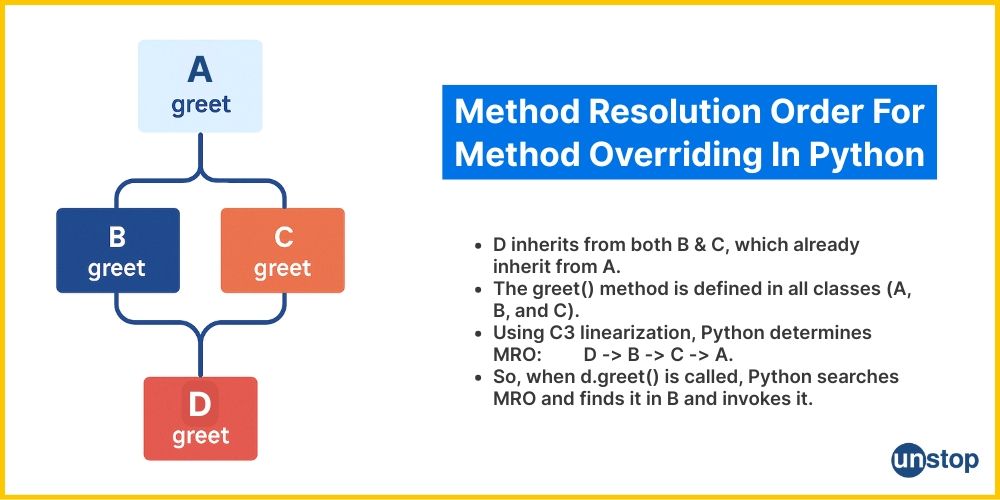
In Odoo, multiple modules can override the same method:
Your Module → Another Module → Base Odoo Module
If any one of these overrides skips super(), the chain breaks — and all downstream logic is lost.
Best Practice Pattern
def method_name(self, *args, **kwargs): # Pre-processing logic self.pre_logic() # Call parent method result = super().method_name(*args, **kwargs) # Post-processing logic self.post_logic() return result
This structure ensures:
- Base functionality remains intact
- Your customization runs safely
- Return values remain consistent
Common Mistakes Developers Make
🚫 Forgetting to call super()
🚫 Not returning the parent method’s result
🚫 Incorrect overrides of create() and write()
🚫 Replacing base actions instead of extending them
Overriding in Odoo should extend functionality — not replace it.
Using super() ensures core workflows execute correctly.
Returning the result ensures UI navigation and system responses work as expected.
Call super(), store the result, and return it — unless you have a very specific reason not to.
Following this approach keeps your custom modules:
✔ Stable
✔ Upgrade-safe
✔ Fully compatible with Odoo’s business logic